

Setting It Up
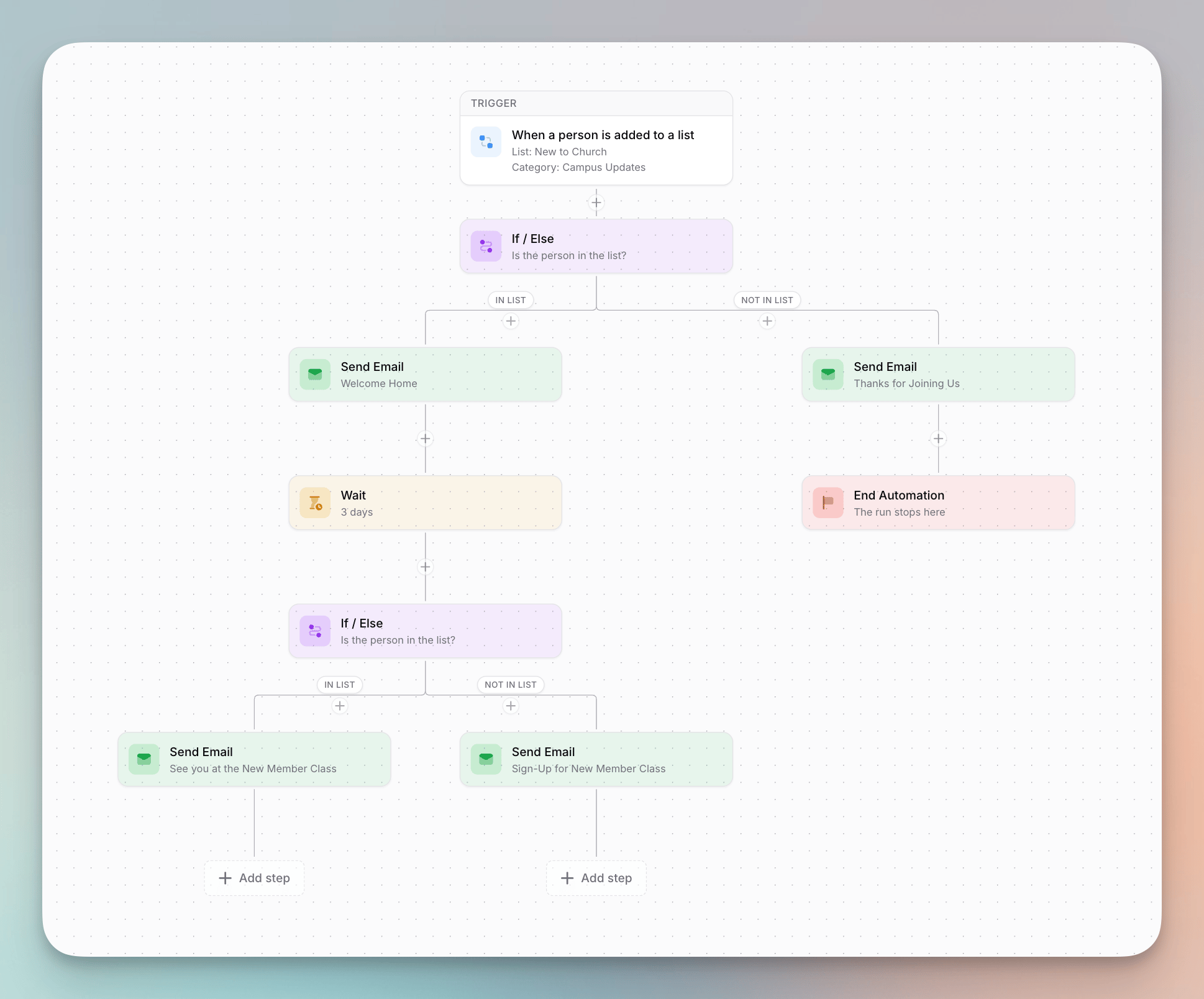
Add an If / Else step and choose the list to check. The canvas splits below the step into two paths:- In list — for people who are in the list
- Not in list — for people who aren’t
How Branching Works
- Membership is checked live. We check Planning Center at the moment a person reaches the If / Else step — not when they entered the automation. If someone joins or leaves the list during an earlier wait, they’re routed based on where they are right now.
- Paths run independently. A wait on one path never delays people on the other. If the “In list” path waits 5 days and the “Not in list” path waits 6, each group keeps its own timing.
- Paths rejoin afterwards. Steps placed after the If / Else run for everyone, once their own path finishes. People rejoin whenever their path is done — they aren’t held for the other path to catch up. A person whose path has no steps skips straight to the shared steps (or finishes, if there aren’t any). This means a condition can sit in the middle of an automation, not just at the end.
- Once routed, people stay on their path. Joining or leaving the list afterward doesn’t move them.
Combine with End Automation
Pair If / Else with an End Automation step to end the run early for one group — for example, skipping the rest of a welcome series for people who are already in your “Members” list.If / Else steps aren’t available on weekly and monthly (scheduled) triggers, which send once to the whole list rather than running per person.